The output format is the part of a film-scan order that most consumer-facing services skip past, and most professional buyers undersell to themselves. You hear 4K, you hear ProRes, you hear archival — words that aren’t wrong but don’t individually answer the question that matters: what am I actually going to do with this file.
This is a practical guide to the three formats that genuinely matter in film digitization — H.264, ProRes, and DPX — written for the buyer who needs to specify, evaluate, or grant-fund a digitization project and wants to skip the marketing layer.
The one-paragraph version
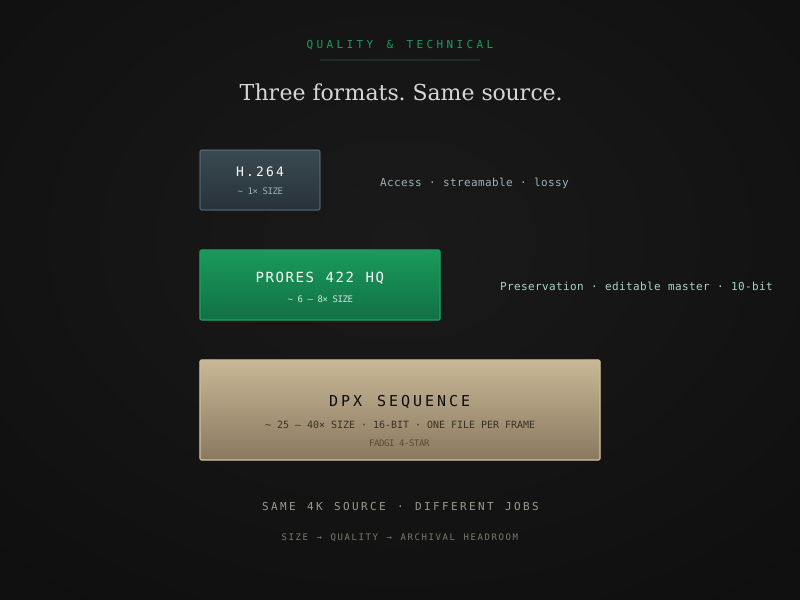
Three formats serve three different jobs:
- H.264 is what you watch. Streamable, widely compatible, lossy, small.
- ProRes is what you edit and color. Mezzanine codec, 10- or 12-bit, lossless or visually lossless, single-file per take.
- DPX is what you archive. 16-bit, log color space, frame sequence (one image per frame), lossless, large.
Each one is the right answer for a different downstream job. They’re not a quality ladder where DPX is “best” and H.264 is “worst.” They’re tools sized to different problems.
H.264 — the access copy
H.264 (officially MPEG-4 AVC) is the codec your phone records to, your TV streams from, and YouTube re-encodes everything into. It’s a lossy codec — visual information is discarded during encoding to hit a small file size — and a remarkably good one given that constraint. A well-encoded 1080p H.264 file at 12–15 Mbps looks excellent for casual viewing.
Use H.264 when:
- You want to watch the footage on a TV, laptop, phone, or browser
- You’re sharing files with family who don’t have professional editing software
- You need an access copy alongside a master format
Don’t use H.264 as your only deliverable when:
- You plan to edit, cut, or color-correct the footage later
- You’re building a long-term family archive
- You’re scanning at Preservation or Archival tier (the H.264 throws away most of what the scan captured)
H.264 file size for a 1-minute clip from a 4K master sits around 30–60 MB at high bitrate. You can store an entire family’s digitized collection on a $20 USB drive.
ProRes — the working master
Apple ProRes is the editorial mezzanine codec that runs the professional video industry. It exists in six flavors; for film scans, two of them matter:
ProRes 422 HQ
10-bit, 4:2:2 chroma subsampling, ~220 Mbps at 1080p (~880 Mbps at 4K). Visually indistinguishable from uncompressed in normal viewing. The standard for editorial intermediates, broadcast deliverables, and most professional master files for home-movie-grade content.
ProRes 4444 (and 4444 XQ)
12-bit, 4:4:4 chroma, optional alpha channel. Higher bit depth captures more color information than 422; matters most when grading from log color space or when you’ll re-grade the file in the future. Roughly 2× the file size of 422 HQ for measurably more color headroom.
Use ProRes when:
- You’re doing any kind of editorial work — cutting, color, audio sync, restoration
- You’re delivering to a client who will use the file in a professional pipeline
- You want a master that’s archival-grade and editable without a transcode step
- You’re working with color-sensitive material (Kodachrome, Eastman Color, hand-tinted footage) where the extra bit depth in 4444 XQ pays off
Practical detail: ProRes is a single-file codec — one .mov file per clip. That makes it dramatically easier to manage, share, and store than DPX sequences. For most professional workflows, ProRes 4444 XQ is the practical archival ceiling — almost as good as DPX, materially easier to work with.
Storage estimate
Roughly 1.5 GB per minute of 1080p ProRes 422 HQ. Roughly 3 GB per minute of ProRes 4444 XQ. 4× those numbers for 4K source.
DPX — the archival master
DPX (Digital Picture Exchange) is a frame sequence format — one image file per frame of film. A 13-minute Super 8 reel scanned at 18 fps produces ~14,000 individual DPX files. They’re typically 10-bit or 16-bit, often in log color space (Cineon log, ARRI Log C, or generic), preserving the full dynamic range the scanner captured.
Use DPX when:
- An institutional or grant requirement specifies it (FADGI-informed practice strongly prefers DPX for film masters)
- You’re building a preservation master that may pass through restoration software in the future
- You need full log color preservation for re-grading flexibility
- The footage will be color-restored at a dedicated facility downstream
Don’t use DPX when:
- You don’t have the storage budget for it (a single 4K reel can hit 150 GB)
- You don’t have software in your pipeline that handles frame sequences cleanly
- ProRes 4444 XQ would meet the requirement and your spec doesn’t explicitly require DPX
Practical detail: DPX is heavyweight in every dimension — size, file count, software requirements. It’s the right answer when the spec calls for it. It’s overkill when ProRes 4444 XQ would do the job.
Storage estimate
Roughly 7–12 GB per minute of 1080p 16-bit DPX. ~30–50 GB per minute at 4K. Plan accordingly.
Bit depth matters more than resolution
The marketing conversation in film digitization is dominated by resolution — 2K, 4K, sometimes 6K. Resolution matters, but for grading and color recovery it’s not the most important variable. Bit depth is.
- 8-bit (H.264 default) gives you 256 levels per channel. Banding shows up in skies, faces, and shadow gradations the moment you push grading.
- 10-bit (ProRes 422 HQ) gives you 1,024 levels per channel. Editorial-grade. Holds up to most color work without banding.
- 12-bit (ProRes 4444 XQ) gives you 4,096 levels. Comfortable headroom for restoration grading.
- 16-bit (DPX) gives you 65,536 levels. Full archival headroom; the format you can re-grade in 20 years without seeing the math.
If you have to choose between a 4K H.264 scan and a 2K ProRes 4444 XQ scan from the same source, the ProRes file will hold up better through any editorial or color work you put it through. Resolution rebuilds; bit depth doesn’t.
How to specify what you actually want
When you order a scan, the right specification looks something like this:
“4K archival scan, 16-bit log capture, delivered as ProRes 4444 XQ master plus DPX 16-bit sequence in log color space, plus H.264 access copy at 1080p. Color management: ACES or equivalent, with calibration records included.”
That single sentence specifies resolution, bit depth, color space, three deliverables sized to three jobs, and accountability for color accuracy. A vendor who can’t deliver that exactly should tell you what they can deliver before you commit.
For most professional film scans you’re ordering today, a less elaborate spec gets the job done:
“Preservation tier, ProRes 422 HQ master plus H.264 access copy.”
That’s the right level for editorial cutting of family footage, documentary B-roll, or any project that’ll be color-corrected in modern editorial software. ProRes 4444 XQ becomes the right ask the moment the project includes restoration, broadcast deliverables, or institutional preservation requirements.
Why FPL bundles all three at Archival
Most labs price by deliverable. We don’t, at the Archival tier — the same scan produces all three formats from one capture pass, and the marginal cost of generating each one from a completed scan is small. At Archival you receive:
- DPX 16-bit log sequence — one image per frame at full scanner resolution
- ProRes 4444 XQ master — the practical working master
- H.264 access copy — for casual viewing and sharing
The Archival tier rate covers all three; you don’t pick one. If you want only ProRes (most editorial workflows do), the file is yours regardless — the DPX sequence sits in your Vault as a deeper backup. If you want only DPX for institutional delivery, the access copies make committee viewing easier without re-encoding.
The pricing is on the pricing page. Per-tier breakdowns of what each deliverable looks like are on the output formats page.
When you should ignore me and ask the institution
Two situations override everything in this guide:
1. A grant or institutional spec specifies a format. If your IMLS or NEH application says “DPX 16-bit, log color space” in its technical section, deliver DPX 16-bit log color space. The spec is the spec. FADGI compliance for film digitization → covers what those specs actually require and how to evaluate a vendor against them.
2. Your editorial pipeline already runs on a different codec. If your house standard is ProRes 422 HQ at 4:2:2, that’s your master. If you’re cutting in DaVinci Resolve and prefer DPX, that’s your master. The right codec is whatever the next step in your pipeline expects to ingest cleanly.
In both cases, the post above is general guidance, not house policy. Tell the lab what your downstream pipeline needs and let them produce it.
The shortest version
If you remember three things:
- H.264 is for watching. ProRes is for working. DPX is for archiving. They’re tools sized to different jobs, not a quality ladder.
- Bit depth matters more than resolution for any future color or grading work.
- You don’t have to pick one. A good scan produces all three from one capture. Ask for what your project actually needs — and ask for an access copy alongside, every time.
For institutional projects with FADGI requirements, follow up with FADGI compliance for film digitization →. For per-tier output specs at FPL specifically, output formats → walks the full deliverable matrix per tier.
Quick answers from the bench
- ProRes 422 HQ is 10-bit, 4:2:2 chroma subsampling, ~220 Mbps at 1080p. ProRes 4444 (and 4444 XQ) is 12-bit, 4:4:4 chroma, with optional alpha — roughly 2× the file size for measurably more color information. For most editorial work on home-movie content, 422 HQ is plenty. For archival masters of color-sensitive material or anything you'll re-grade later, 4444 XQ is the right choice.