If you’re comparing services and the per-foot price is suspiciously low — below about $0.30/ft for film — the service is almost certainly running a projector transfer, not a real scan. Both processes are advertised under the same word, digitization. They are not the same thing.
This is a guide to telling them apart in plain language, with the visible quality differences and the practical reasons the price gap exists.
The one-sentence answer
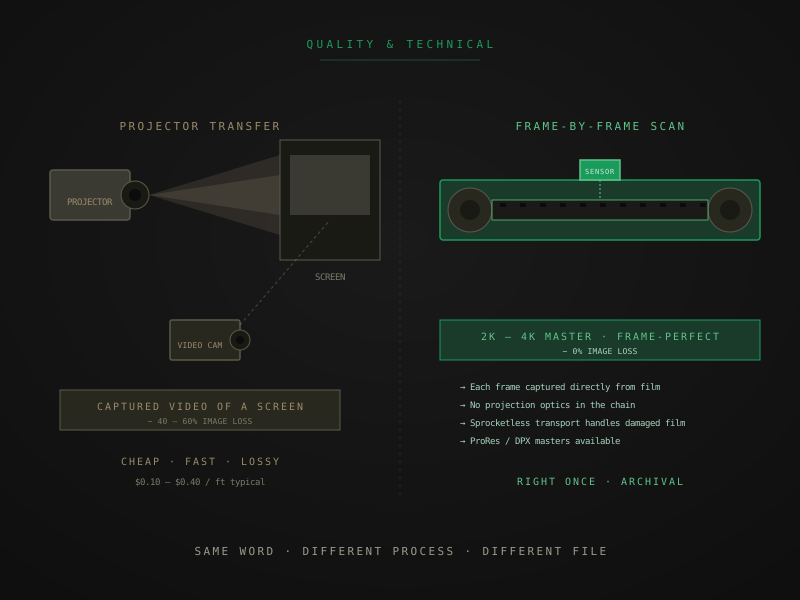
A projector transfer points a video camera at a projected film image. A film scanner captures each frame directly off the original film through a calibrated sensor. The first method loses 40 to 60 percent of the image information; the second loses essentially none. That’s the entire comparison.
What a projector transfer actually is
A projector runs the film through its gate at normal speed (18 fps for Super 8, 24 fps for 16mm and 35mm). The projector shines bright light through each frame and onto a small screen or rear-projection surface. A video camera, mounted nearby, records the projected image as it plays.
The output is a video file. The capture is not of the film — it’s of a projection of the film. Every frame passes through projection optics, hits a screen, gets re-photographed by a camera with its own optics, and lands as a compressed video file.
The cheap-to-run version of this setup looks like a customer-grade projector and a consumer camcorder pointed at it. The mid-tier version uses a converted projector with a CCD sensor in the gate where film used to project onto a screen — sometimes called a telecine setup. Either way, the process is fundamentally projection-based, and the output is a video recording of a projection rather than a direct capture of the film image.
Cost economics: projector transfers run cheap because the equipment is cheap, the labor is fast (the operator threads film, presses record, walks away), and there’s minimal post-processing. A 200 ft Super 8 reel runs through in 13 minutes; a $20 charge per reel can still be profitable.
What a frame-by-frame film scanner actually is
A film scanner pulls the film through a precisely engineered transport, holding it flat in the gate, and captures each frame individually with a calibrated digital sensor. No projection optics in the chain. No video camera pointed at a screen. The light source is a high-quality LED matched to the scanner’s sensor; the captured image is what the sensor reads off the film directly.
Native capture resolution sits at 2K, 4K, or higher depending on the scanner model and the chosen tier. Bit depth runs 10-bit log at the editorial level, with higher bit depths available at the archival level. Color space at capture is typically log, preserving the full dynamic range of the original film stock.
The transport on a modern professional film scanner is sprocketless — it holds film by the edges rather than engaging the sprocket holes. That’s the key engineering difference that lets these machines safely handle brittle film, shrunken film, and film with damaged perforations. A scanner with sprocketless transport can scan film a projector would tear.
Cost economics: scanners cost 100× what a projector-camera setup costs. Operator labor is higher per reel (inspection, cleaning, color pass, QC). Post-processing is non-trivial. The per-foot rate for real scanning sits around $0.42/ft and up because the process actually costs that to run sustainably at quality.
The visible quality gap
Sharpness, color, stability, and shadow detail all separate cleanly between the two methods. Side-by-side comparison takes about ten seconds to settle the question for any reasonable observer.
Sharpness. A projector transfer captures whatever the camera can see on the projection screen — never sharper than the screen image itself, and reduced by the camera’s own optical limits and resolution. A scan captures detail that’s genuinely on the film, including fine textures (skin, hair, fabric, text) that projection-based capture can’t resolve.
Color accuracy. Projector transfers inherit the color shift of the projection system — bulb temperature drift, screen color cast, ambient light contamination. They typically can’t do scene-by-scene color correction because the source isn’t cleanly recoverable. A scan starts from a calibrated capture in log color space; manual scene-by-scene color correction is feasible at Preservation tier and above, and the result is much more faithful to the original film’s intended look.
Frame stability. Projector transfers show the projector’s mechanical instabilities — the wobble, the registration drift, the bounce as sprocket holes engage and disengage. A scan with sprocketless transport eliminates this entirely. Frame jitter is gone, not merely reduced.
Shadow detail. Projector transfers crush shadow areas because the projection system has limited contrast range and the camera’s sensor receives less light in dark regions. A scan in 10-bit or 16-bit log captures the full dynamic range the film stock holds, including shadow detail that becomes visible after grading.
These four differences show up immediately in a side-by-side comparison. They’re not subjective and they’re not subtle.
The hidden quality gap
What you don’t see until you try to do something with the footage:
- Editing and color correction. A projector-transfer file falls apart visually the moment you push grading. Banding shows up in skies and skin tones; shadows lose detail entirely; color shifts become visible because there wasn’t enough source information to grade against. A scan-source file holds up to grading because it has the bit depth and color space to support it.
- Upscaling and large-screen viewing. A 1080p projector transfer looks rougher than expected on a 65-inch TV. A 4K archival scan looks comfortable. The difference compounds the bigger the display.
- Future use. The footage you preserve today will be watched and edited on equipment that doesn’t exist yet, by people who don’t exist yet. A scan-source file gives them headroom. A projector-transfer file gives them what your projector and your camera saw at the moment of capture, locked in forever.
How marketing blurs the line
The honest version: terminology games are common and worth knowing about.
- “Professional” or “archival quality” describing projector-transfer output. Both words are used loosely; neither is a guarantee of method.
- “HD” or “1080p” referring to the camera’s recording resolution rather than what was captured off the film. A 1080p camera pointed at a projected Super 8 image still produces a 1080p file — but the actual film information in that file is much less than 1080p’s worth of detail.
- “4K” claims from services that have a 4K capture camera in a projector-camera setup. The capture is technically 4K; the film information in it is not.
- “Telecine” as a category term that can cover both projector-based and direct-capture setups, depending on era and equipment. Asking for the specific scanner make and model resolves the ambiguity.
The reliable test is to ask, in writing, what equipment is used and what the native capture resolution off the film is. A real scanning service answers with a specific scanner make and model and a specific native capture resolution. A projector-transfer service answers with marketing language or doesn’t answer at all.
Why the prices are different
Real labor and equipment costs, not markup:
- A frame-by-frame scanner costs $40,000 to $250,000+ depending on tier. A projector-camera setup costs $500 to $5,000.
- Per-reel labor on a real scan includes intake inspection, manual cleaning, splice repair, scanner setup per reel, color pass, and quality control. Projector transfer skips most of that.
- Real scans deliver multiple output formats (H.264 access copy, ProRes editorial master, DPX or ProRes 4444 XQ archival master at higher tiers). Projector transfers deliver one MP4 file.
- Software licenses for color and editorial pipelines (DaVinci Resolve, Topaz, archival metadata tools) add real cost to the scanning operation.
A service charging $0.20/ft is doing a different process than a service charging $0.98/ft. Both might be honest businesses for their respective customer bases. Conflating them — treating $0.20 as a deal and $0.98 as an upsell — is what the marketing layer encourages and the actual quality gap doesn’t support.
When projector transfer is genuinely fine
Two situations:
1. The film is in good condition and you want to watch it once. A projector transfer of healthy film, encoded to a watchable file, costs less and gets the job done if you’re not planning to do anything else with it. Casual viewing of a wedding reel that doesn’t need to outlive the next decade is a legitimate use case for the cheap method.
2. Budget is the binding constraint. When the alternative is don’t digitize at all, a projector transfer of healthy film is better than nothing. The footage gets recorded; you can re-scan later if priorities change.
In both cases, the right move is to be honest with yourself about what you’re buying. Pay $0.25/ft for a projector transfer expecting projector-transfer output. Don’t pay $0.25/ft expecting archival-grade preservation, then feel cheated by the result.
When you should pay for real scanning
The cases that justify the per-foot rate gap:
- Anything you want to edit, color-correct, or restore later
- Anything you want to view on modern equipment (4K TVs, projectors, large monitors)
- Damaged or fragile film that a projector would destroy
- Institutional and grant-funded projects (FADGI-informed practice requires real scanning)
- Family archives meant for the next generation, not casual one-time viewing
For deeper coverage of the archival-vs-standard quality argument with output-format detail, archival scan vs standard transfer is the longer companion piece.
The shortest version
If you remember three things:
- Projector transfer captures a projection. Real scanning captures the film. That’s the entire mechanical difference.
- The visible quality gap is not subtle. Sharpness, color, stability, shadows — all four separate cleanly when you compare files.
- The price gap reflects real equipment and labor costs, not markup. Cheap services are running a cheaper process; that’s a legitimate business model for some uses, and the wrong choice for others.
The right method depends on what you actually plan to do with the file. Watch once and forget? Projector transfer of healthy film might be fine. Preserve for grandchildren or do anything editorial? Real scanning is the only honest answer.
Quick answers from the bench
- Ask directly — what equipment do you use to capture the image, and what is the native capture resolution off the film. A real frame-by-frame scanner has a make and model (Lasergraphics ScanStation, Filmfabriek HDS+, BlackMagic Cintel, FilmFabriek Pictor) and captures at 2K to 6K native resolution off the film itself. A projector transfer setup will mention a projector and a camera, and the capture resolution will refer to the camera, not the film. If a service avoids the equipment question or answers vaguely with marketing language, it's probably the projector method.