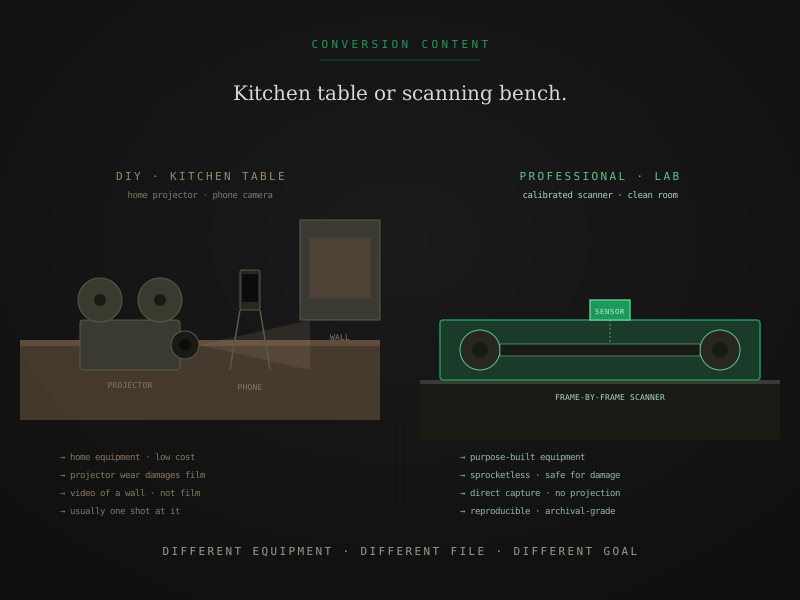
The DIY-versus-professional question is one of the most-asked in film digitization, and the answer that gets repeated most often — just use a professional — isn’t honest. DIY is a real option, with real upsides and real risks. The right answer depends on what you have, what you can afford to lose, and what you want the file to do for you long-term.
This is a practical breakdown of when DIY makes sense, when it doesn’t, and what each path actually involves.
What DIY film digitization actually is
The setup, in its simplest form: project the film onto a screen or wall, point a digital camera or phone at the screen, record the projection. The output is a video file of the projected image.
That’s the entry-level version. More elaborate DIY setups include:
- Modified projectors with CCD or CMOS sensors mounted in the gate, replacing the bulb-and-screen path with direct digital capture
- Dedicated capture cards that take video output from a modified projector and record it cleanly
- Capture software that handles deinterlacing, color correction, and format conversion
- Editing software for post-processing, splitting clips, and adding any titling
The investment scales with ambition. A working entry-level setup — eBay projector, phone on a tripod, free editing software — can be assembled for $100 to $300. A serious DIY enthusiast setup with modified projector, capture card, and color-grading software runs $800 to $1,500.
Even the high-end DIY setup is fundamentally a projector-camera method. The output is a video recording of a projection, not a direct capture of the film.
What you actually get from DIY
The honest version of what DIY produces:
Output quality
A projection-based capture loses 40 to 60 percent of the original image information through three mechanisms: projection optics (the bulb-lens-screen path soft-focuses the original frame), real-time camera capture (the camera resolution and shutter limits constrain detail), and lossy intermediate encoding (most consumer cameras compress to H.264 or similar in real time).
The resulting file:
- Looks soft and slightly washed-out compared to a frame-by-frame scan
- Shows projection artifacts — flicker from the projector shutter, hot-spotting from uneven illumination, screen reflection
- Has limited shadow and highlight detail
- Doesn’t hold up to editing, color correction, or upscaling
For the deeper comparison of how this looks in practice, projector transfer vs film scanner walks the visible quality differences side by side.
Time investment
The hidden cost. Each reel takes 30 to 60 minutes of capture (you have to watch and supervise) plus another 30 to 60 minutes of post-processing — encoding, splitting, color-correcting, organizing. A 50-reel family collection at that rate is 50 to 100 hours of focused work, typically spread across weeks or months of evenings.
The first 10 reels take longer than the last 10 because of the learning curve. A non-trivial number of DIY projects get abandoned halfway through with a partial digital archive and reels that are now in worse condition than when they started.
What you control
The upside, honestly described:
- Total ownership of the process. You decide everything — capture order, color choices, splits between clips, file organization.
- Immediate access to the originals. No shipping, no insurance worries, no waiting weeks for a lab.
- The project itself, if you enjoy it. Some people genuinely find DIY film transfer satisfying as a hobby. That’s a legitimate reason on its own.
The risks DIY actually carries
Three risks that aren’t hypothetical:
1. Projector damage to the film
Old projectors mechanically engage the film through sprocket teeth that hook into the perforations on the edge of the strip. The teeth pull the film through the gate by yanking on those holes. For healthy film with intact perforations, this is fine. For anything compromised:
- Brittle film snaps when the teeth engage. Once a frame breaks, you have a broken reel and possibly several damaged frames around the break point.
- Shrunken film doesn’t fit the sprocket spacing. The teeth grip wrong perforations or skip them entirely, jamming the transport or tearing the film.
- Vinegar syndrome film is structurally weakened by the chemical decay. Running it through a projector accelerates physical damage on top of the existing chemistry.
- Damaged perforations — common on reels that have been projected many times before — give the teeth nothing to grip, leading to slips, jumps, or further perforation tears.
Once the original reel is damaged, the digital file you produce from it is the only version you’ll have, and it’s a damaged version. Professional scanning labs use sprocketless transport that holds film by its edges instead of the perforations — specifically because this risk is real and serious for older collections. For deeper coverage, sprocketless film transport walks the engineering.
2. Reels that go missing in the process
A more mundane but very real risk: you start digitizing a 50-reel collection, get through 15 reels in good condition, lose track of which reels you’ve done, mis-label something, set aside the project for a few months, and come back to find the workflow state irrecoverable. DIY projects have higher dropout rates than people expect.
3. Sunk-cost fallacy on bad equipment
A typical DIY trajectory: buy a $200 projector, find that it’s not good enough, buy a $500 modified projector, find that the capture card is the bottleneck, spend another $400 on a better one, end up two-thirds of the way to the cost of professional scanning with a setup that still doesn’t produce archival-grade output. Some hobbyist DIYers spend more than they would have on a professional lab and still produce inferior files.
Where DIY makes genuine sense
Three situations:
1. Healthy film, casual viewing, hobbyist enjoyment
If your film is in good condition (no smell, no warping, no brittleness), you’re digitizing primarily for casual viewing rather than archival preservation, and you genuinely enjoy hands-on projects, DIY is a fine answer. The output won’t look like a professional scan, but it’ll be watchable, and the project itself can be satisfying.
2. Budget is binding and the alternative is no-digitization
If the choice is spend $500 on DIY equipment versus spend $2,000 at a professional lab versus don’t digitize at all, DIY is the right call when the third option is what you’d otherwise choose. A DIY copy of healthy film is dramatically better than no copy.
3. You want to test before committing
DIY can be a useful first pass — capture rough versions of everything, then send the reels you actually care about to a professional lab for archival-grade scans. This lets you triage your collection without committing to professional pricing on every reel.
Where DIY is the wrong call
1. Damaged or fragile film
Any reel showing vinegar syndrome, brittleness, mold, shrinkage, or visible deterioration should not go through a home projector. The risk to the original is too high relative to the savings. For deeper coverage of which symptoms warrant specialist handling, film deterioration: what’s happening to your film right now is the umbrella reference.
2. Editorial or archival intent
If you plan to edit, color-correct, restore, or preserve the digitized files for serious downstream use, DIY output doesn’t hold up. The file format, bit depth, and color space all fall short of what editorial workflows expect. Re-doing the work later on better equipment costs more than doing it right the first time.
3. Large collections where time matters
If your collection is large enough that DIY time investment exceeds the price gap on a per-hour basis — which is true for most adults whose evenings are worth more than $20/hour — professional scanning is cheaper in real terms.
4. Rare or irreplaceable footage
If you have one reel of something you genuinely cannot replace — a documentary original, the only known copy of a family event, content with historical significance — the risk of damaging it during DIY scanning is not worth the savings. Send it to a professional lab.
A practical decision framework
Five questions that resolve the choice:
- Is the film in good condition? If no, professional. If yes, continue.
- Do you plan to edit, restore, or preserve archivally? If yes, professional. If no, continue.
- Is your collection more than ~20 reels? If yes, the time investment usually pushes toward professional. If no, continue.
- Do you genuinely enjoy hands-on technical projects? If yes, DIY can be satisfying. If no, professional.
- Is the original film rare or irreplaceable? If yes, professional. If no, DIY is on the table.
For most family collections from the 1970s and 80s in good condition, DIY produces acceptable casual-viewing files at reasonable cost. For older collections, damaged collections, or anything intended for serious downstream use, professional scanning is the right answer.
A reasonable hybrid
For mixed-condition collections, the practical pattern is to triage:
- Smell-test and visual-inspect every reel. Sort into healthy and affected piles.
- Healthy reels can go DIY if you’re inclined. Acceptable for casual viewing.
- Affected reels — any vinegar smell, any visible warping, any brittleness — go to a professional lab. The cost gap on these specific reels is justified by the recovery quality and the safety of their handling.
This split usually keeps the professional spend manageable while ensuring the at-risk material gets the right treatment. For coverage of how to do the smell test and visual inspection, vinegar syndrome — the complete guide walks the protocol.
The shortest version
If you remember three things:
- DIY film digitization is real, not a scam, and not a universally wrong choice. Healthy film, hobbyist enjoyment, casual viewing — legitimate uses.
- Old projectors damage old film. The risk is mechanical and not avoidable through care alone. Anything fragile or deteriorated should not go through a home projector.
- Output quality has hard ceilings on DIY that no amount of money or care fully closes. Projector-based capture loses 40 to 60 percent of the original image regardless of equipment quality.
The most honest answer is: DIY for healthy film and hobby projects, professional for damaged film and archival intent, and a hybrid approach for mixed collections where you’d rather not pay professional rates for everything.
Quick answers from the bench
- At the simplest, a working projector for the format you have, a screen or wall, a digital camera or phone on a tripod, and software to clean up the output. That setup runs about $100 to $300 in used equipment from eBay or local listings. A more involved setup includes a refurbished projector with a CCD modification, a dedicated capture card or external recorder, and editing software, totaling $800 to $1,500. The output quality scales with budget, but even the most expensive DIY setup is fundamentally a projector-camera method, which has hard quality limits regardless of how much money you spend on it.