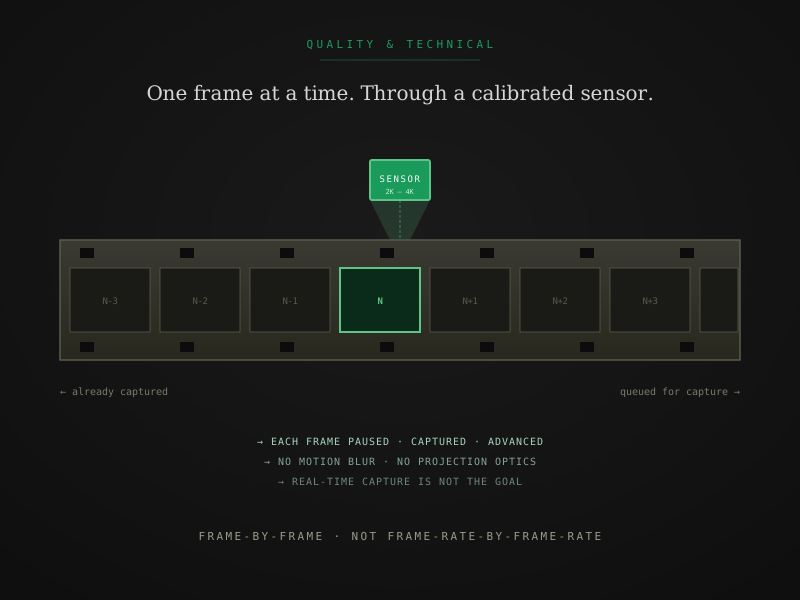
The phrase “film scanning” gets used loosely in marketing copy. It can mean a real frame-by-frame capture from a calibrated digital scanner, or it can mean a video-camera recording of a projected film image, or several intermediate methods that fall somewhere between. The differences matter for the file you end up with.
This is a plain-language explanation of what frame-by-frame scanning actually is mechanically, why it produces a better file than the alternatives, and what to look for when you’re evaluating a digitization service that claims to do it.
The shortest possible explanation
Frame-by-frame scanning is exactly what it sounds like. The film is held stationary. A digital sensor captures one frame. The film advances to the next frame. The sensor captures it. Repeat for every frame on the reel.
The film is not played. There is no projector, no screen, no real-time camera capture. The capture is decoupled from playback speed entirely. A frame-by-frame scan of a 200-foot Super 8 reel takes 30 to 60 minutes, not the 13 minutes the reel runs at 18 fps. That slowness is the point — it’s what allows each frame to be captured perfectly.
What happens during a single frame capture
Inside the scanner, each frame goes through the same sequence:
- The film advances to position the next frame in the gate
- The transport pauses the film, held flat against a precisely engineered platen
- A high-quality LED light source illuminates the frame from behind (or front, depending on scanner design)
- The sensor captures the frame at its native resolution, in the chosen bit depth and color space
- The captured image is written to the scanner’s output buffer
- The film advances to the next frame
Step 2 is the part that distinguishes frame-by-frame scanning from real-time capture methods. The film is stationary at the moment of capture. There is no motion at the sensor. No motion blur. No need for a fast shutter to compensate for movement. The capture sees a fixed image and records it cleanly.
Why frame-perfect capture matters
Three structural advantages over any real-time method:
1. No motion blur
In real-time capture — whether through a projector-and-camera setup or an old line-scan telecine running at projection speed — the film is moving at the moment the sensor or camera reads it. Even at high shutter speeds, that motion translates to subtle blur in the captured image. Frame-by-frame eliminates this entirely. The sensor sees a stationary image and records exactly what’s on the film at that instant.
2. Perfect frame alignment
A projector or real-time telecine pulls film through a gate using sprocket teeth. Each engagement and disengagement of those teeth introduces a tiny mechanical shift — the registration drift you see in old home-movie footage as a slight bouncing or weaving of the image. Frame-by-frame scanners, especially those with sprocketless transport, position each frame against a fixed reference and capture from the same physical position every time. The result is rock-stable image registration across the entire reel.
3. Calibrated, consistent capture
Real-time capture systems have to make compromises to keep up with playback speed. The light source has to be bright enough to expose the camera at projection speed. The sensor has to be fast enough to read each frame in roughly 1/24 second. The optical path has to feed both the projection and the camera, often dimming the source through a beam-splitter. Frame-by-frame scanning has none of these constraints. The scanner can take 0.1 second per frame or 1 full second per frame — whatever produces the best capture — without affecting the result. The lighting is calibrated, the sensor runs at its optimal sensitivity, and the captured file is consistent across the entire reel.
Capture resolution off the film, not output resolution
A common marketing trap is conflating capture resolution with output resolution. They are not the same thing.
Capture resolution is what the scanner’s sensor reads off the film itself, frame by frame. A genuine 4K scanner captures at 4K native off the film — that’s 4096×3112 pixels per frame, sampled directly from the film image.
Output resolution is the size of the final delivered file. A 4K capture might be downscaled to 1080p H.264 for streaming, encoded at 4K ProRes 4444 XQ for editorial use, or saved as 4K DPX for archival. The capture resolution determines the ceiling; the output resolution is whatever the deliverable format calls for.
When evaluating a service, ask specifically what the capture resolution off the film is. A service that answers with the camera resolution or the output file resolution — rather than the sensor’s native capture — is probably running a real-time method that captures at the camera, not at the film.
For a deeper comparison of how capture resolution interacts with bit depth and codec choice, 2K vs 4K film scanning walks the resolution question and ProRes, DPX, H.264 — choosing your output format walks the codec question.
Sprocketless vs sprocket-driven transport
Frame-by-frame scanning is one part of the equation. The other part is how the film is moved through the scanner. Two approaches exist:
Sprocket-driven transport uses mechanical teeth that engage the perforations on the edge of the film — the same way a projector pulls film through its gate. Sprocket-driven transport is mechanically simple but unforgiving of damaged film. If the perforations are torn, shrunken, or degraded, the teeth can’t engage properly and the film either jams, slips, or tears further.
Sprocketless transport holds film by the edges of the strip rather than the perforations. Two soft rollers or air-bearing surfaces grip the film edges, advancing the strip without engaging the perforations at all. Sprocketless transport handles damaged film, brittle film, vinegar-syndrome film, and shrunken film safely. It’s the engineering breakthrough that made archival-grade scanning of fragile collections possible.
Modern professional film scanners almost universally use sprocketless transport. It’s the right answer for any institutional or family archive that includes older or deteriorated film — which is most of them.
For the deeper mechanical explanation of why sprocketless transport matters and what it makes possible, sprocketless film transport is the longer companion piece.
The complete frame-by-frame pipeline
A real frame-by-frame scan involves more than just the capture. The full pipeline at a quality lab looks roughly like this:
- Intake inspection — visual check of the reel, condition assessment, splice repair if needed
- Cleaning — conservation-grade hand cleaning to remove dust and contamination before capture
- Scanner setup — load the reel, configure capture resolution and tier, calibrate against reference targets
- Frame-by-frame capture — the slow part, where every frame on the reel passes through the sensor
- Color correction — either automated (Access tier) or scene-by-scene manual (Preservation and Archival)
- Quality control — visual review of the captured file against the original, flag any frames needing rework
- Output encoding — produce the requested deliverable formats (H.264, ProRes, DPX) from the master capture
- Delivery — package the files, generate checksums, deliver via the customer-facing portal
Steps 1 through 4 take more time than steps 5 through 8 combined for most reels. A 200-foot Super 8 scan involves roughly 30 to 60 minutes of capture, plus 30 to 60 minutes of inspection, cleaning, and color work, plus 10 to 20 minutes of QC and encoding. That total — usually 70 to 130 minutes of operator and machine time per reel — is what the per-foot rate is paying for.
What to ask when evaluating a service
If you’re evaluating a digitization service and want to know whether they’re actually doing frame-by-frame scanning, three concrete questions resolve it:
- What scanner do you use? A real frame-by-frame scanner has a make and model — Lasergraphics ScanStation, Filmfabriek HDS+, BlackMagic Cintel, FilmFabriek Pictor, MWA Flashscan Nova, or similar. A vague answer or one referencing a projector-camera setup is a different process.
- What is your native capture resolution off the film? The answer should be specific (2K, 4K, 6K, etc.) and refer to what the sensor reads off the film, not what the output format encodes to.
- Is the transport sprocketless? This question has a yes-or-no answer. Sprocketless transport is the modern standard for any service handling older or potentially damaged film.
Services that answer these questions clearly and specifically are doing real frame-by-frame scanning. Services that hedge or pivot to marketing language usually aren’t.
For the broader projector-vs-scanner comparison with the visible quality differences side by side, projector transfer vs film scanner is the longer piece.
The shortest version
If you remember three things:
- Frame-by-frame means each frame is captured stationary, not while moving. The capture is decoupled from playback speed entirely.
- The result is a calibrated, frame-perfect file — no motion blur, no registration drift, no projection optics in the chain.
- The mechanical advantage of frame-by-frame is real, but it’s only the foundation. Output format, bit depth, and color pipeline are separate decisions that determine the final quality of the deliverable.
If a service can’t name the scanner they use or won’t specify the native capture resolution, they probably aren’t running a real frame-by-frame setup. That’s the test.
Quick answers from the bench
- Telecine is a broader term for any process that converts film to video. Older telecine setups used flying-spot tubes or CCD line scanners running film at near-real-time speeds — and many cheap consumer services still use projector-camera setups loosely called telecine. Modern frame-by-frame scanning is a distinct, more recent approach where each frame is paused, captured individually, and advanced. The terminology overlaps in casual use; the engineering does not.