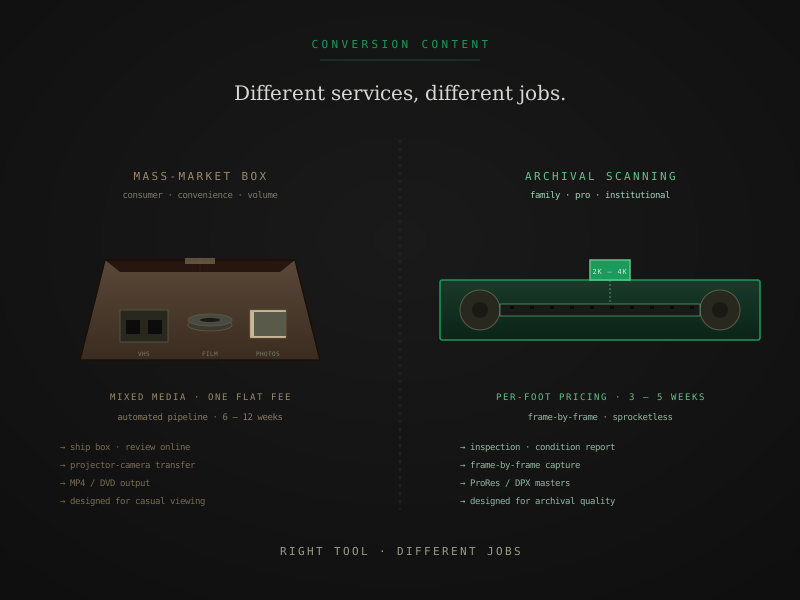
The honest version of this comparison starts with a fact that matters more than any technical detail: Legacybox and a professional film scanning lab are different products solving different problems.
A Legacybox-style mass-market service is built for the customer who wants convenience — one box, one flat fee, mixed media, fast turnaround on a casual viewing file. A professional scanning lab is built for archival-grade preservation, per-foot pricing, frame-by-frame capture, and master-grade output formats. They are not better-and-worse versions of the same product. They are not even quite the same category.
This is a practical breakdown of what each one delivers and which one fits which job — written without pretending the cheaper service is bad or the expensive service is the universal answer.
What each service actually is
Mass-market consumer services (Legacybox and similar)
The model: ship a flat-rate box, fill it with mixed media (film reels, VHS tapes, photo albums, audio cassettes), send it back. The lab digitizes everything in an automated pipeline and returns digital files plus optional DVDs. Pricing is by box capacity rather than by media type, which means film, tape, and photos all share the same flat fee per slot.
The capture method varies by media. For video tapes, the process is reasonably good — there’s no lossy intermediate step, just real-time playback through a video capture card. For photos, flatbed scanning at 300 to 600 DPI works well for basic digitization. For film, the process is typically projector-based transfer — a video camera recording a projected film image — which is the cheapest film-digitization method but loses 40 to 60 percent of the original image information.
Output is typically H.264 MP4, sized for streaming and casual viewing. Not editorial-grade. Not archival-grade. Designed for the customer who wants to watch the file once with family and not think about it again.
The pricing for Legacybox-style services starts around $75 for the smallest boxes and runs up to $300+ for larger packages. The customer-friendly framing — flat fee, one shipment — works well for the convenience-first audience.
Professional film scanning labs
The model: per-foot pricing on film specifically, with capture-and-output specifications matched to preservation requirements. Each format and tier has its own rate. The capture method is frame-by-frame scanning from a calibrated digital scanner with sprocketless transport — each frame paused, captured, advanced. No projection, no real-time camera capture, no lossy intermediate.
Output formats scale with tier. At a typical professional lab:
- Access tier — H.264 1080p for casual viewing
- Preservation tier — ProRes 422 HQ master plus H.264 access copy
- Archival tier — DPX 16-bit log sequence plus ProRes 4444 XQ master plus H.264 access copy
For deeper coverage of what each output format means, ProRes, DPX, H.264 — choosing your output format walks the spec.
Per-foot pricing at FPL specifically: $0.42 / $0.98 / $1.65 per foot for Super 8, 8mm, and 16mm at Access, Preservation, and Archival tiers. 35mm runs $0.68 / $1.45 / $2.35. Per-service handling fees apply on top.
Turnaround at a professional lab typically runs 3 to 5 weeks for consumer orders and 4 to 6 weeks for 35mm and institutional projects, versus 6 to 12 weeks at mass-market services.
Where the prices actually differ
The price gap between mass-market and professional scanning is real and reflects actual differences in process. Three places the cost lives:
Equipment
A mass-market projector-camera setup costs $500 to $5,000. A professional frame-by-frame scanner costs $40,000 to $250,000+. The capital cost amortizes over the per-foot rate. A service running cheap equipment can offer cheap pricing sustainably; a service running an institutional-grade scanner cannot.
Labor per reel
Mass-market services are built for throughput — load the projector, press record, walk away. Professional scanning involves intake inspection, manual cleaning, splice repair as needed, scanner setup per reel, scene-by-scene color correction at Preservation tier and above, and quality control review. Labor per reel is several times higher.
Output deliverables
Mass-market services typically produce one MP4 file per reel. Professional scanning at Preservation tier produces a master file plus an access copy; at Archival tier it produces three or four different deliverables sized for different downstream uses. The marginal cost of generating each format from a finished scan is small, but it’s real.
The 2-to-3x price gap between a Legacybox-style box and a professional scan of the same footage isn’t arbitrage. It’s the cost difference of running a different process.
Which service fits which job
The framework that resolves the choice cleanly:
Mass-market service is the right call when
- The footage is in good condition with no signs of vinegar syndrome, brittleness, or significant deterioration
- You want mixed-media digitization in one shipment — film plus tape plus photos — and value the convenience over per-media specialization
- The intended use is casual viewing — you want files to watch with family, share at gatherings, and not think about technically
- Budget is the binding constraint and the alternative is don’t digitize at all
- The film is common stock (unsentimental Super 8 from a typical 1970s family camera, etc.) where re-scanning later if priorities change is feasible
Professional scanning is the right call when
- The footage is damaged or fragile — vinegar syndrome at any stage, brittleness, shrinkage past 1 percent, or any visible deterioration that a projector might worsen
- You plan to edit, color-correct, or restore the digitized files — H.264 from mass-market services does not hold up to that workflow
- You’re building a family archive intended to outlast you — the master files become the canonical version and quality matters
- The project is institutional or grant-funded with any preservation requirement
- The footage is rare or irreplaceable — documentary originals, the only known copy of something, or content with historical significance
- You’ll watch the result on modern displays (4K TVs, large monitors) where mass-market output looks visibly soft
Both are legitimate
Neither service is a scam. Neither is the universal right answer. The mistake people make is paying mass-market prices expecting professional output, then feeling cheated — or paying professional rates expecting Legacybox-grade convenience and feeling overcharged.
The honest framing: what are you actually going to do with the file? Casual one-time viewing makes Legacybox a fine choice. Anything beyond that — editing, restoration, archival storage, institutional preservation — makes professional scanning the right call.
What to ask before ordering from any service
Three concrete questions that surface the difference reliably:
1. What scanner do you use, and what is its native capture resolution?
Real frame-by-frame scanners have a make and model — Lasergraphics ScanStation, Filmfabriek HDS+, BlackMagic Cintel, MWA Flashscan Nova. Native capture resolution should be specific (2K, 4K, 6K). A vendor whose answer is vague or refers to camera resolution rather than scanner sensor capture is probably running a projector-based method.
For a deeper walk-through of this distinction, projector transfer vs film scanner covers the visible quality differences side by side, and frame-by-frame film scanning covers how the capture mechanism works.
2. What output formats do I receive at my chosen tier?
A real archival lab delivers a master file (ProRes or DPX), an editorial intermediate, and an access copy — not just a single H.264 MP4. The number and type of deliverables tells you whether the service is built around long-term file utility or short-term viewing convenience.
3. Do you handle damaged film, and if so, with what equipment?
Mass-market services either refuse damaged film or scan it on equipment that further damages it. Professional labs use sprocketless transport that handles brittle, shrunken, and vinegar-affected film safely. Asking the question filters honest answers from marketing language quickly.
For deeper coverage of why this matters, sprocketless film transport walks the engineering.
Mixed collections: a realistic answer
Many family collections include film plus tapes plus photos. Mass-market services solve this elegantly with one box; professional film labs typically handle film only. Three patterns that work:
Send everything to a mass-market service. Right answer if the collection is in good condition, you want convenience, and casual viewing is the goal. The video and photo digitization at most mass-market services is genuinely competent; the gap is mostly on film.
Split the work. Send film to a professional film lab. Send tape and photos to either the same lab if they handle those (some do), or to a tape-and-photo specialist. Two shipments instead of one, but each gets the right pipeline.
Stage the work. Start with what matters most. If a few film reels are showing vinegar symptoms and the rest of the collection is healthy, send the affected reels to a professional lab now and the rest of the collection to a mass-market service later (or vice versa).
For collections where the film specifically is the priority, you inherited a box of film, now what walks the inventory-and-prioritize approach in detail.
The shortest version
If you remember three things:
- Legacybox and professional scanning are different services. Convenience-first mass-market versus archival-grade preservation. Not better-and-worse versions of the same product.
- The price gap is real and reflects different processes. Cheap services run cheap equipment with fast labor. Professional services run expensive equipment with careful labor. Both are honest at their respective price points.
- Choose based on what you’ll do with the file. Casual one-time viewing of healthy film — mass-market is fine. Editing, restoration, archival storage, damaged-film recovery, or institutional preservation — professional scanning is the right call.
The most expensive mistake people make is paying for the wrong category — mass-market when archival was needed, or professional when convenience was the actual goal. Knowing which job you’re hiring the service to do prevents both.
Quick answers from the bench
- No. Legacybox is the right service for a specific use case — customers who want a single flat-rate box for mixed media, prefer the convenience of one shipment for film plus tapes plus photos, and intend to watch the digitized output casually rather than edit, restore, or preserve archivally. For that customer, Legacybox is a legitimate solution. Calling it bad assumes everyone has the same goal as a professional scanning lab customer, which is not true.