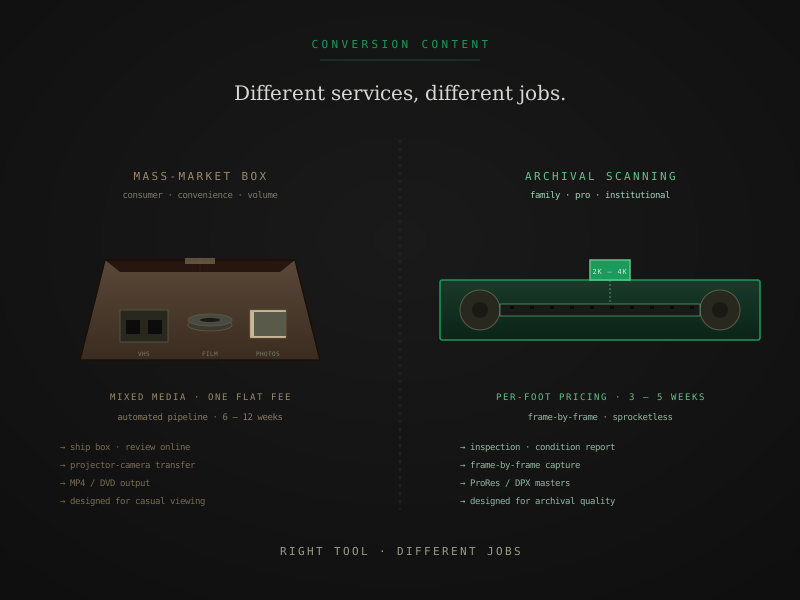
iMemories markets itself as a one-stop shop for digitizing the entire shoebox of family memorabilia — film, tape, photos, audio, slides — at a flat per-item rate that’s easier to understand than the per-foot, per-tier rate cards of specialist labs. It’s a legitimate service, well-suited to a specific kind of customer.
It’s also not the right service for every job. This is a practical comparison of mass-market mixed-media digitization (iMemories and similar) against archival film scanning, with honest guidance on when to use which.
What each service is, briefly
iMemories and similar mass-market services
The model: ship the contents of your media closet — film reels, VHS tapes, slides, prints, audio cassettes — in a prepaid box. The lab digitizes everything in an automated pipeline, returns digital files via cloud delivery and optional physical media, and charges per item rather than per foot or per hour.
Advertised pricing typically runs $10 to $20 per item across formats. A film reel, a VHS tape, and a stack of 25 photos each count as “an item” in different ways depending on the service’s rules — the abstraction smooths over the technical differences between formats and lets the customer think in terms of how many things do I have rather than how many feet of film.
For tape, iMemories runs real-time playback through a video capture card, which produces a competent H.264 file from any healthy tape. For photos, the process uses high-volume flatbed or feed-scanner equipment that produces 300 to 600 DPI scans — enough for screen viewing, sharing, and print up to 5x7 or 8x10. For film, the process is typically projector-based transfer, which is the low-cost film-digitization method.
Output across all formats is sized for casual viewing, sharing with family, and online streaming. Not editorial-grade. Not archival-grade. Designed for the customer who wants files they can play, share, and not think about technically.
Archival film scanning labs
The model: per-foot pricing on film specifically, with capture-and-output specifications matched to preservation requirements. Each format and tier has its own rate. Capture method is frame-by-frame scanning from a calibrated digital scanner with sprocketless transport — the same machine used by institutional preservation projects.
A typical professional lab’s tier structure looks like:
- Access — H.264 1080p file for casual viewing
- Preservation — ProRes 422 HQ master plus H.264 access copy
- Archival — DPX 16-bit log sequence plus ProRes 4444 XQ master plus H.264 access copy
Per-foot rates at FPL: $0.42 / $0.98 / $1.65 for Super 8, 8mm, and 16mm at the three tiers. 35mm runs $0.68 / $1.45 / $2.35. Per-service handling fees apply on top.
The reasons to pay these rates: damaged-film handling, archival-grade output formats, scene-by-scene color correction at Preservation tier and above, calibrated capture pipelines, and chain-of-custody documentation for institutional projects.
For deeper coverage of what each tier delivers, output formats: ProRes, DPX, H.264 walks the spec. For the comparison framework that resolves which tier matches which use case, archival scan vs standard transfer is the longer piece.
Where iMemories does well
Honestly: most of what iMemories sells, it does competently.
Tape digitization. Real-time capture from a healthy VHS tape produces a watchable 480p H.264 file. The process doesn’t lose anything significant compared to higher-cost services unless the tape itself is degraded (sticky-shed syndrome, mold, severe oxide loss). For a shoebox of family VHS, mass-market service rates are reasonable.
Photo scanning. 300 to 600 DPI feed scanning of paper prints produces files good enough for screen viewing and small prints. Not archival-grade for color-sensitive originals or large prints, but adequate for most family snapshot collections.
Slides and negatives. Similar territory — mass-market scanning at moderate resolution covers casual viewing. For genuinely high-resolution slide work (Kodachrome originals where you want every detail recovered), specialist photo scanning services do better, but iMemories is fine for typical collections.
Mixed-media convenience. The flat-rate-per-item model is genuinely convenient. One box, one shipment, one bill, one online portal for the digitized files. For a customer who values not-thinking-about-it as a feature, this is real value.
Where film specifically falls short
The gap between mass-market and archival shows up most clearly on film. Three reasons:
1. Capture method
Most mass-market services use projector-based transfer for film — a video camera recording a projected image. The method is fast and cheap, but it loses 40 to 60 percent of the original image information through projection optics, real-time camera capture, and lossy intermediate encoding. The result is a video file that looks soft, stable to a degree but not perfectly so, and limited in shadow and highlight range.
Archival scanning is frame-by-frame — each frame paused, captured by a calibrated digital sensor, and advanced. No projection. No real-time camera limitation. The output preserves essentially everything the film holds.
For deeper coverage of the visible quality gap, projector transfer vs film scanner walks the comparison side by side.
2. Damaged film handling
Mass-market film transfer typically uses sprocket-driven transport — mechanical teeth that engage the perforations. Brittle film, shrunken film, or film with damaged sprockets jams or tears in this kind of transport. Most mass-market services either refuse damaged film or quietly damage it further during the transfer.
Archival scanning labs use sprocketless transport that handles damaged film safely. For older collections (anything 50+ years old) or any film showing signs of deterioration, this is the difference between recovery and loss.
3. Output formats
Mass-market services produce one MP4 file per reel. Archival labs produce master files (ProRes, DPX) plus access copies plus metadata documentation. The marginal cost of generating each output from a finished scan is small, but it’s real — and the master files are what hold up to editing, restoration, and long-term preservation.
For a casual viewer who wants a watchable file once, an MP4 is fine. For anyone who might do something with the footage in the next decade beyond pressing play, the master files matter.
A comparison table
A practical reference for the dimensions that actually differ:
| Dimension | iMemories / mass-market | Archival film scanning lab |
|---|---|---|
| Pricing model | Per item, flat rate across media | Per foot of film, per-tier |
| Mixed-media support | Yes — film, tape, photos, audio | Usually film only; refer out for tape and photo |
| Film capture method | Typically projector-based transfer | Frame-by-frame scanning |
| Damaged-film handling | Limited; may refuse or damage further | Sprocketless transport handles brittleness, shrinkage, vinegar |
| Native capture resolution | Camera resolution (varies) | 2K to 4K+ from scanner sensor |
| Output formats (film) | H.264 MP4 typically | H.264 + ProRes + DPX at higher tiers |
| Color correction | Automated only | Scene-by-scene manual at Preservation+ |
| Turnaround | 6 to 12 weeks typical | 3 to 5 weeks consumer, 4 to 6 institutional |
| Best fit | Casual viewing · mixed-media convenience | Archival preservation · damaged film · editorial |
| Per-reel cost (rough) | $15 to $30 per reel | $50 to $400+ depending on reel size and tier |
When to use each
The framework that resolves the choice cleanly:
iMemories is the right call when
- You have a mixed-media shoebox — film, tape, photos, audio — and want one shipment
- The film is in good condition with no signs of deterioration
- You want casual viewing files for sharing with family, not master-grade archives
- Convenience is more valuable than quality optimization for the film specifically
- The collection is typical 1970s/80s home video where re-scanning later if priorities change is feasible
Archival film scanning is the right call when
- The film is older than 50 years or shows any signs of deterioration
- You plan to edit, color-correct, or restore the digitized files
- The collection includes rare, irreplaceable, or institutionally significant footage
- You’re building a family archive intended to outlast you
- You’ll watch the result on modern displays where mass-market output looks visibly soft
- The project has grant or institutional preservation requirements (FADGI-informed documentation, etc.)
A common right answer: split the work
For mixed collections where you genuinely have both situations — tapes and photos that fit the mass-market profile and film that warrants archival treatment — the practical pattern is:
- iMemories or similar handles the tape and photo work efficiently
- Archival film lab handles the film specifically
Two shipments. Each piece of media gets the right pipeline. Total cost typically lands lower than scanning everything at archival rates and higher than mass-market across the board, but the quality outcome is genuinely better than either monoculture.
For a deeper walkthrough of inventory-and-prioritize across mixed collections, you inherited a box of film, now what walks the practical decision flow.
What to ask before ordering
Three concrete questions that surface the difference reliably:
1. What capture method do you use for film specifically?
Mass-market services usually answer with marketing language or describe a camera-based setup. Archival labs name a specific scanner and capture resolution. The clarity of the answer is itself the answer.
For deeper coverage, frame-by-frame film scanning walks the technical distinction.
2. What output formats do I receive at the price tier I’m paying for?
Mass-market services typically produce one H.264 MP4 per item. Archival labs produce master + intermediate + access copies. The number and type of deliverables tells you whether the service is built for casual viewing or long-term preservation.
3. Do you handle film with vinegar syndrome or significant damage?
This question filters honest answers from marketing claims fast. Mass-market services either refuse such film or quietly damage it further. Archival labs answer specifically with what their sprocketless scanner handles and where the limits are.
For coverage of what those limits look like, sprocketless film transport is the longer technical piece.
The shortest version
If you remember three things:
- iMemories is good at what it advertises — convenient mixed-media digitization for casual viewing. Tape and photo output is genuinely competent.
- Film specifically is where the gap shows — mass-market projector-based methods produce noticeably lower quality than frame-by-frame archival scanning, and the gap matters most for older or damaged footage.
- Splitting the work is often the right answer for mixed collections — mass-market service for tape and photos, archival lab for film. Two shipments, each piece of media to the right pipeline.
iMemories isn’t a scam. An archival scanning lab isn’t an upsell. They’re different services solving different problems. The most expensive mistake is paying for the wrong category — or paying twice for the same media because the first attempt fell short of what the footage actually needed.
Quick answers from the bench
- Neither, in the simple sense. iMemories is a competent mass-market consumer service that does most of what it advertises — digitize mixed-media collections and deliver watchable digital files at a predictable per-item price. For tape and photo digitization, the result is generally good. For film specifically, the capture method is typically projector-based transfer rather than frame-by-frame scanning, which produces lower-quality output than an archival scanning lab. Whether that matters depends on what you intend to do with the files.